1탄은 아래 링크에서 확인이 가능하다:
2026.03.29 - [Dev Log] - 크롬 익스텐션 만들기 1
크롬 익스텐션 만들기 1
크롬 익스텐션은 마치 브라우저 위에 직접 동작하는 앱을 만드는 느낌이다. 그래서 예전부터 크롬 익스텐션을 만들어보고 싶었는데 마땅히 아이디어가 없었어서 미루다가 이번 기회에 그냥 어
cookieandcache.tistory.com
자 이제 chat gpt 에 cursor 에 요청할 프롬프트를 작성해달라고 한다.
I want to build a Chrome Extension (Manifest V3) that extracts job posting data from the current webpage and allows users to download it as a CSV file.

Please generate a minimal but production-structured project with the following requirements:

[Core Features]
1. "Add Current Job"
- Extract job information from the current page using content script
- Fields:
  - title
  - company
  - job_description
  - qualification
  - tech_stack (array)
- Store extracted data in chrome.storage.local

2. "Download CSV"
- Convert stored job data into CSV format
- Trigger file download from the browser

[Tech Requirements]
- Manifest V3
- Use chrome.storage.local for persistence
- Use content script for DOM extraction
- Use popup.html + popup.js for UI
- No external libraries (vanilla JS only)

[Project Structure]
- manifest.json
- popup.html
- popup.js
- content.js

[Details]
- popup should have two buttons:
  1. "Add Current Job"
  2. "Download CSV"
- communication between popup and content script using chrome.tabs.sendMessage
- include basic error handling (e.g., if data not found)
- include comments in code explaining key parts

[Bonus]
- Make the content script generic (use querySelector with fallback logic)
- Make CSV generation handle commas and line breaks safely

Please generate full code for all files.
해당 프롬포트를 Cursor에 붙여놓고 기다리면 코드가 아래와 같이 생성된다.
생성된 코드 구성
기다리면 4개 파일이 생성된다.
파일 역할
| manifest.json | Manifest V3 설정. activeTab, storage, scripting 권한 선언 |
| popup.html | 팝업 UI. 저장된 공고 수 뱃지 + 두 개 버튼 |
| popup.js | 스토리지 읽기/쓰기, CSV 생성, 파일 다운로드 트리거 |
| content.js | DOM에서 데이터 추출. 사이트별 셀렉터 + 폴백 로직 |
주요 기능 요약:
- 중복 방지 — 같은 title + company + URL 조합은 두 번 저장되지 않는다
- CSV 안전 처리 — 쉼표, 줄바꿈, 큰따옴표가 포함된 텍스트도 RFC 4180 방식으로 이스케이프
- tech_stack 자동 추출 — 직무 설명에서 React, Python, AWS 등 약 90개 키워드를 정규식으로 스캔
- qualification 섹션 파싱 — h2/h3 헤딩 텍스트를 읽어 "requirements", "qualifications" 등의 섹션을 자동으로 찾아 추출
// manifest.json
{
  "manifest_version": 3,
  "name": "Job Hunter",
  "version": "1.0.0",
  "description": "Extract job posting data from any page and download it as CSV.",

  "permissions": [
    "activeTab",
    "scripting",
    "storage"
  ],

  "host_permissions": [
    "<all_urls>"
  ],

  "action": {
    "default_popup": "popup.html",
    "default_title": "Job Hunter"
  },

  "content_scripts": [
    {
      "matches": ["<all_urls>"],
      "js": ["content.js"],
      "run_at": "document_idle"
    }
  ]
}
//popup.html
실제 HTML 아래와 같고 CSS는 생략했다.
<body>
<header>
<!-- briefcase icon -->
<svg width="26" height="26" viewBox="0 0 24 24" fill="none"
stroke="rgba(255,255,255,0.9)" stroke-width="2"
stroke-linecap="round" stroke-linejoin="round">
<rect x="2" y="7" width="20" height="14" rx="2"/>
<path d="M16 7V5a2 2 0 0 0-2-2h-4a2 2 0 0 0-2 2v2"/>
<line x1="12" y1="12" x2="12" y2="12"/>
<path d="M2 12h20"/>
</svg>
<div>
<h1>Job Hunter</h1>
<p>Extract & save job postings</p>
</div>
</header>
<main>
<!-- Saved job counter -->
<div id="counter-row">
<span>Saved jobs</span>
<span id="job-count">0</span>
<button class="clear-btn" id="clear-btn" title="Clear all saved jobs">Clear all</button>
</div>
<div class="divider"></div>
<!-- Status message -->
<div id="status" role="alert"></div>
<!-- Primary action -->
<button class="btn btn-primary" id="add-job-btn">
<!-- plus icon -->
<svg width="15" height="15" viewBox="0 0 24 24" fill="none"
stroke="currentColor" stroke-width="2.5"
stroke-linecap="round" stroke-linejoin="round">
<line x1="12" y1="5" x2="12" y2="19"/>
<line x1="5" y1="12" x2="19" y2="12"/>
</svg>
Add Current Job
</button>
<!-- Download action -->
<button class="btn btn-secondary" id="download-btn">
<!-- download icon -->
<svg width="15" height="15" viewBox="0 0 24 24" fill="none"
stroke="currentColor" stroke-width="2.5"
stroke-linecap="round" stroke-linejoin="round">
<path d="M21 15v4a2 2 0 0 1-2 2H5a2 2 0 0 1-2-2v-4"/>
<polyline points="7 10 12 15 17 10"/>
<line x1="12" y1="15" x2="12" y2="3"/>
</svg>
Download CSV
</button>
</main>
<script src="popup.js"></script>
</body>
</html>
// popup.js
loadJobs : storage에서 저장된 공고 목록을 읽어옴

function loadJobs() {
  return new Promise((resolve) => {
    chrome.storage.local.get("jobs", ({ jobs }) => {
      resolve(Array.isArray(jobs) ? jobs : []);
    });
  });
}
saveJobs : 공고 배열을 storage에 저장

function saveJobs(jobs) {
  return new Promise((resolve) => {
    chrome.storage.local.set({ jobs }, resolve);
  });
}
Add Current Job 핸들러 : content script에 메시지를 보내 데이터를 받아 저장. 중복은 title + company + url로 체크

const response = await chrome.tabs.sendMessage(tab.id, { action: "extractJob" });
// ...
const isDuplicate = jobs.some(
  (j) => j.title === jobData.title && j.company === jobData.company && j.url === jobData.url
);
escapeCsvField : 쉼표·줄바꿈·큰따옴표가 있으면 "..."로 감싸고 내부 "는 ""로 이스케이프

function escapeCsvField(value) {
  const str = (value === null || value === undefined) ? "" : String(value);
  const needsQuoting = str.includes(",") || str.includes('"') || str.includes("\\n");
  if (!needsQuoting) return str;
  return `"${str.replace(/"/g, '""')}"`;
}
buildCSV : 컬럼 정의 배열을 순회해 헤더+행을 만들고 UTF-8 BOM을 앞에 붙여 Excel 한글 깨짐 방지

function buildCSV(jobs) {
  const BOM = "\\uFEFF";
  const header = CSV_COLUMNS.map((col) => escapeCsvField(col.label)).join(",");
  const rows = jobs.map((job) =>
    CSV_COLUMNS.map((col) => {
      const value = typeof col.key === "function" ? col.key(job) : job[col.key];
      return escapeCsvField(value);
    }).join(",")
  );
  return BOM + [header, ...rows].join("\\r\\n");
}
triggerDownload : Blob → <a> 태그 클릭으로 파일 다운로드 트리거

function triggerDownload(content, filename) {
  const blob = new Blob([content], { type: "text/csv;charset=utf-8;" });
  const url = URL.createObjectURL(blob);
  const anchor = document.createElement("a");
  anchor.href = url;
  anchor.download = filename;
  document.body.appendChild(anchor);
  anchor.click();
  document.body.removeChild(anchor);
  setTimeout(() => URL.revokeObjectURL(url), 1000);
}
//content.js
firstText : 셀렉터 배열을 순서대로 시도해 첫 번째로 텍스트가 있는 요소 반환

function firstText(selectors, root = document) {
  for (const selector of selectors) {
    const el = root.querySelector(selector);
    const text = el?.innerText?.trim();
    if (text) return text;
  }
  return null;
}
extractTitle / extractCompany / extractDescription : 사이트별 셀렉터를 우선 시도하고 없으면 범용 셀렉터·meta 태그로 폴백

function extractTitle() {
  return (
    firstText([
      '[data-testid="jobsearch-JobInfoHeader-title"]', // Indeed
      '.job-details-jobs-unified-top-card__job-title', // LinkedIn
      '[data-ui="job-title"]',                         // Greenhouse
      'h1',                                            // 범용 폴백
    ]) ||
    metaContent(["og:title"]) ||
    document.title?.trim() || ""
  );
}
extractQualification : 전용 섹션이 없으면 h2~h4 헤딩을 스캔해 "requirements" / "experience" 키워드 뒤의 형제 요소를 추출

const headings = document.querySelectorAll("h2, h3, h4, strong, b");
for (const heading of headings) {
  if (heading.innerText?.toLowerCase().includes("qualification")) {
    // 다음 형제 요소들을 최대 5개까지 수집
  }
}
extractTechKeywords : ~90개 키워드를 word boundary 정규식으로 매칭해 오탐 방지

const regex = new RegExp(`(?<![\\\\w.])${escaped}(?![\\\\w.])`, "i");
// "React"는 잡고 "Reactive"는 걸러냄
extractTechStack : 스킬 뱃지 요소 텍스트 + 키워드 스캔 결과를 합쳐 중복 제거

function extractTechStack(descriptionText = "") {
  const tagTexts = allText(['[class*="skill-badge"]', '[class*="skill"]', ...]);
  const fromKeywords = extractTechKeywords(descriptionText);
  // 소문자 기준으로 dedup 후 반환
}
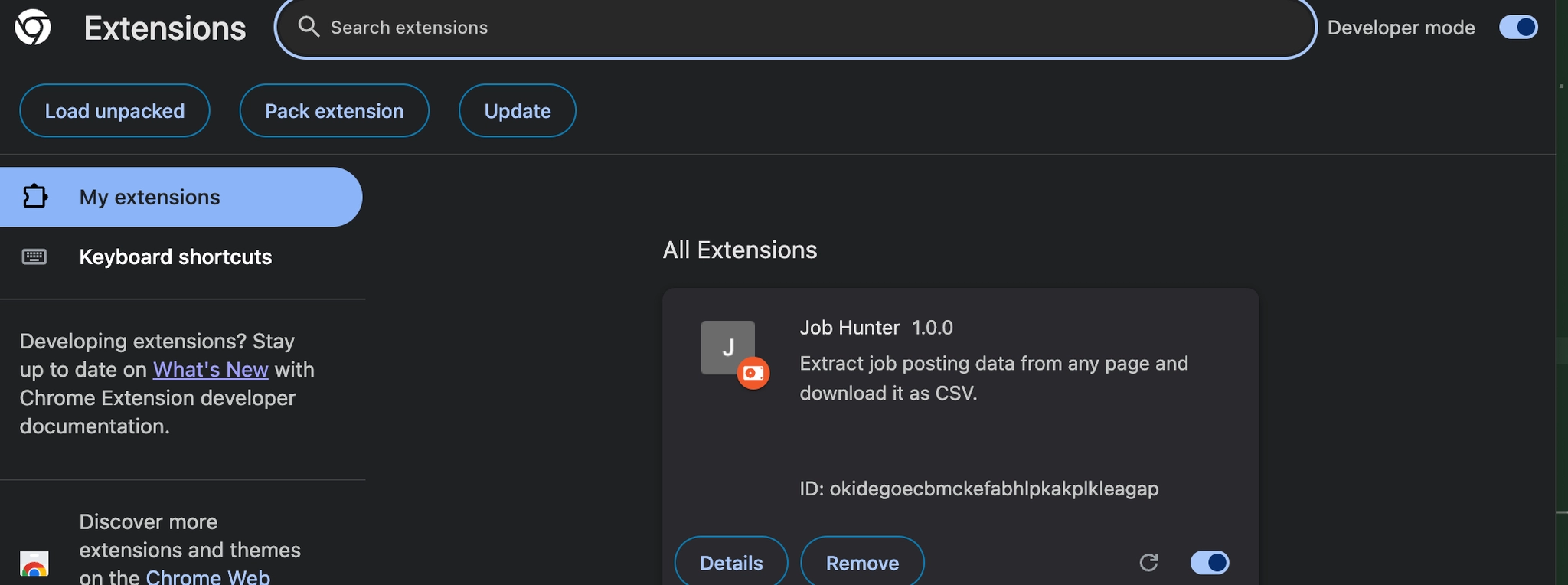
내가 만든 크롬 사용해보는 방법
크롬에서 사용해보는 방법은 다음과 같다:
- chrome://extensions 에 접속한다
- 상단에 Developer Mode를 킨다
- ‘Load unpacked’ 버튼을 클릭한다.
- 프로젝트 폴더를 생성한다.
아래와 같이 내가 만든 크롬익스텐션이 뜬다.
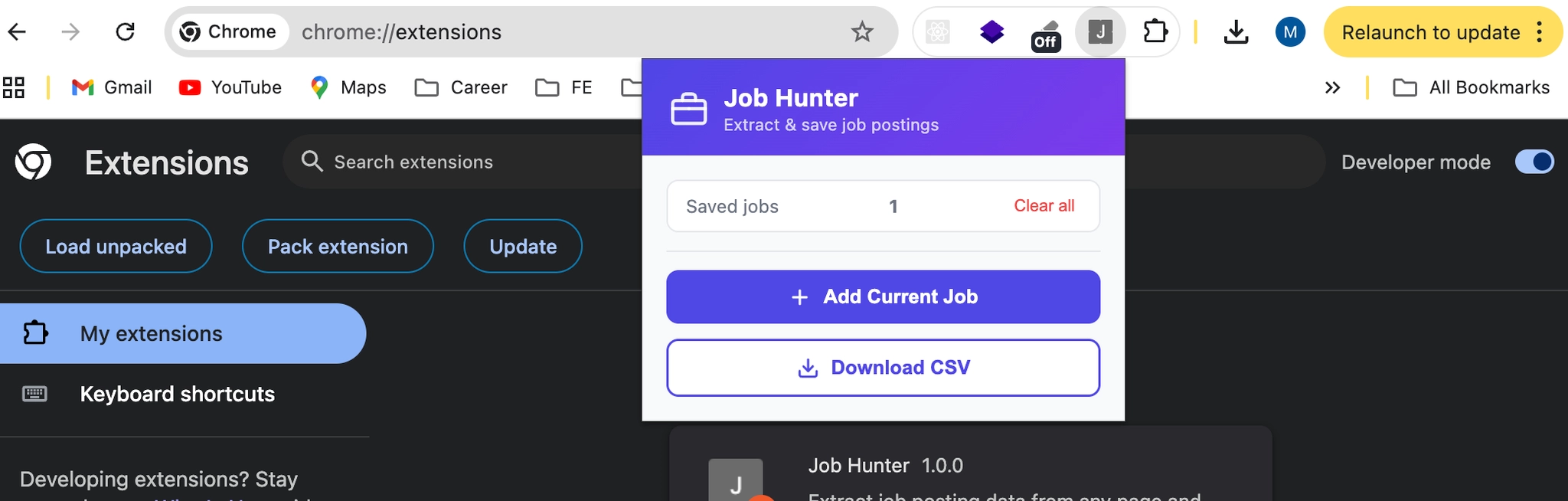
특정 회사 채용 공고 페이지에 들어가서 Add Current Job → Download CSV 순서로 눌렀다.
결과적으로 tech_stack, qualification, job_description, URL까지 한 줄로 정리된 CSV가 다운로드됐다. 여러 공고를 돌아다니며 누적 저장한 뒤 한 번에 내려받으니 스프레드시트 정리 시간이 확 줄었다.
아래는 완성된 CSV 파일!

아무래도 MVP인 만큼 한계가 있었다. 사이트마다 HTML 구조가 달라서 일부 공고는 데이터가 비거나 엉뚱한 텍스트가 들어오는 경우가 있었다. 특히 SPA(싱글 페이지 앱) 구조로 동적으로 렌더링되는 페이지에서는 셀렉터가 빗나가기 쉽다.
프로덕션 레벨로 쓰려면 사이트별 셀렉터 튜닝이나 에러 핸들링 보강이 필요하지만, "일단 동작하는 버전"을 빠르게 검증하는 용도로는 충분했다. 기획만 잘 다듬고 보강만하면 많은 사람이 사용하는 Extension 만들 수 있지 않을까?? (열린 결말)
'Dev Log' 카테고리의 다른 글
| Git Worktree 마스터하기X 알아보기O (2) | 2026.04.26 |
|---|---|
| IntelliJ에서는 안 되고, Gradle에서는 되는 이유 (PKIX 에러 해결기) (0) | 2026.04.15 |
| Android WebView safe-area 이슈 대응 (Chromium 버전 변화 포함) (0) | 2026.04.05 |
| 크롬 익스텐션 만들기 1 (0) | 2026.03.29 |
| 개발자가 알아야 하는 A/B 테스트와 관련 지표 (0) | 2026.03.22 |